36 Qwen Image Edit Prompt Ideas That Actually Work
Copy-paste instructions for backgrounds, objects, styles, text, portraits and restorations — tested phrasing for the open Qwen Image Edit model.
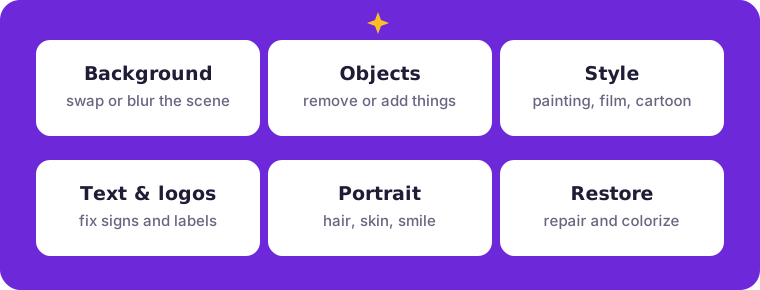
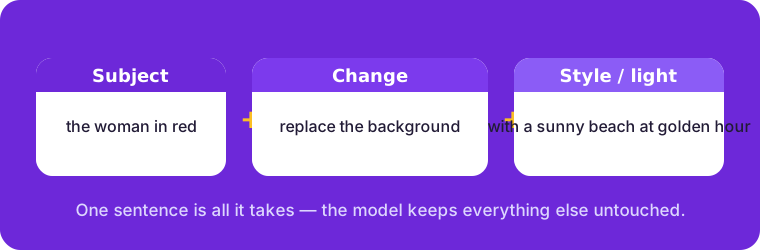
Good instructions are the difference between a lucky edit and a reliable one. The 36 prompts below are written the way Qwen Image Edit likes them: name the subject, say exactly what to change, and add a keep-it note when something must stay untouched. Click any prompt to copy it, paste it into the editor, and adapt the nouns to your photo.
Background swaps & cleanup
“Replace the background with a clean white studio wall, keep the subject untouched”
“Move the family photo to a sunny beach at golden hour”
“Blur the background like a portrait lens, keep the subject sharp”
“Put the car on an open mountain road at sunset”
“Make the background a cozy bookshop interior with warm light”
“Change the background to a stadium crowd on match day”
Remove & add objects
“Remove the photobomber in the background, fill the space naturally”
“Delete the trash bin next to the bench”
“Add a bunch of colorful balloons to the birthday table”
“Remove the power lines from the sky”
“Add a wool blanket and two mugs of cocoa to the picnic scene”
“Take the strangers out of the background of this street photo”
Style & season transfer
“Turn this photo into a watercolor painting”
“Make it look like a vintage 1970s film photograph”
“Convert the scene to a snowy winter version”
“Restyle the photo as a Pixar-style 3D cartoon”
“Make it look like a comic book panel with bold ink lines”
“Change a summer shot into autumn with orange leaves”
Text, signs & logos
“Fix the shop sign so it reads OPEN in clean white letters”
“Replace the text on the poster with SALE 50% OFF”
“Remove the watermark from the corner”
“Change the jersey number on the back to 23”
“Replace the logo on the mug with a small green leaf”
“Erase the graffiti from the wall behind the subject”
Portrait & people
“Whiten the teeth naturally, keep the smile identical”
“Change the hair color to chestnut brown”
“Put a friendly smile on the subject while keeping the face recognizable”
“Dress the subject in a navy suit, keep pose and face the same”
“Remove the glare from the glasses”
“Smooth the skin slightly and keep every natural detail”
Restore & colorize
“Restore this old photo: remove scratches and creases, sharpen the faces”
“Colorize this black-and-white photo with natural tones”
“Fix the faded colors and improve the contrast”
“Remove the yellow stain from this scanned print”
“Recover the details in the dark areas of this night photo”
“Upscale this small photo and sharpen the text”
Do and don’t
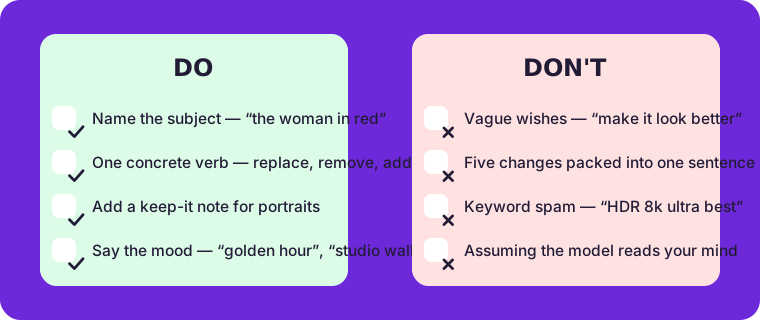
Why these prompts work
Three habits make an instruction land on the first try. First, lead with the subject so the model knows what must survive the edit unchanged. Second, use one concrete verb — replace, remove, add, restore — instead of vague wishes like “make it better”. Third, add a style or lighting hint when you care about the mood: “golden hour”, “clean studio wall”, “natural tones”. When a result feels off, don’t start over; edit the same photo again with a sharper sentence — the model treats every instruction independently, so iterating is free and instant.
Frequently asked questions
Can I combine two changes in one prompt?
Yes, but keep them related — “replace the background with a beach and warm up the lighting” works; five unrelated changes in one sentence dilutes all of them. Chain edits one at a time instead: edit, download, edit again.
How long can a prompt be?
One to three sentences is the sweet spot. Everything the model needs fits in a sentence; anything longer usually hides a second edit that deserves its own pass.
Do prompts need keywords in English?
The model understands natural English best, and simple phrasing translates well too. Describe the change the way you would explain it to a person holding the photo.
Ready to try one? Open the photo editor or skim the step-by-step guide first.